


USPS MOBILE®
4.720.43K Reviews
App Specs
- Version
- 6.2.1
- Updated On
- License
- Free
- Downloads
- 1,000,000+
- Developer
- United States Postal Service®
- Categories
- Business
- Platform
- Android, iOS
Screenshots
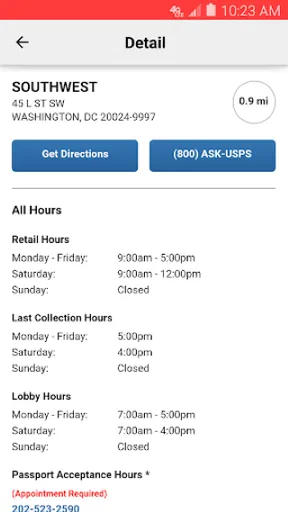
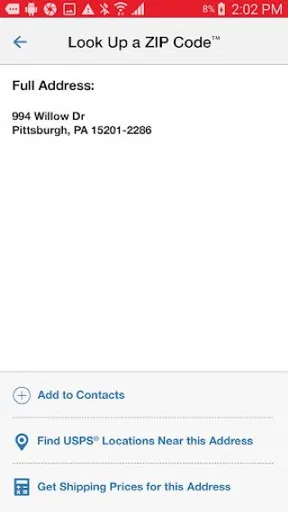
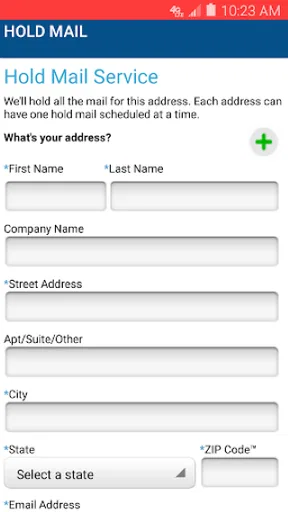
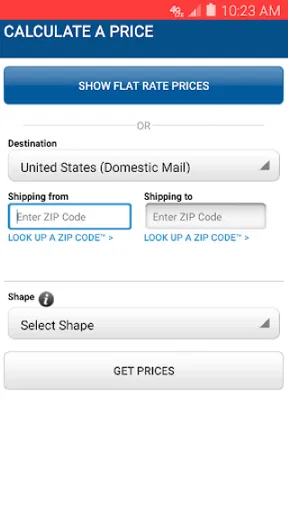
 Analysis by AppCompare
For me, USPS Mobile is most useful when postal tasks are part of ordinary life rather than a rare errand: checking a parcel, planning a shipment, or locating a nearby post office without switching between several tools. It brings those jobs into one place, and that convenience is its strongest argument. It is a free business app from United States Postal Service®, rated for Everyone, and I’d recommend it most to people who already rely on USPS services. If you only need to follow one occasional delivery, it may be more app than you need; if you regularly send or receive mail, having the main tasks together can make a real difference.
A practical hub, not a replacement for every postal task
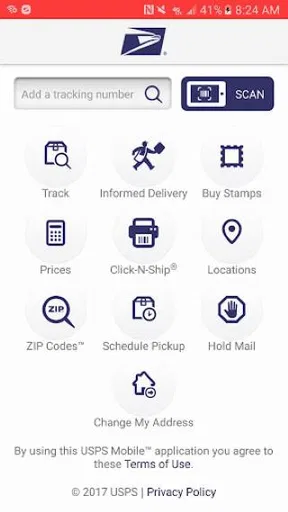
The useful way to think about the app is as a mobile starting point for common USPS errands. Package tracking is the feature many people will open first, but pickup scheduling, nearby post office searches, and shipping-price calculations give it a broader role. That mix matters because the tasks often connect: I might check a delivery, then decide to send a return, look up a location, or estimate the cost of mailing something else. Keeping those steps under one roof is more convenient than beginning from scratch each time.
There is a trade-off, though. A dedicated tracking tool can feel simpler if all I want is a single status check. USPS Mobile asks me to navigate a wider set of postal services, which is worthwhile when I use them but less compelling for someone who rarely mails anything. I see it as a practical companion to USPS, not a universal shipping dashboard or a substitute for every service offered by other carriers.
Where its official connection helps
Because it comes from the United States Postal Service®, the app is a natural place to check USPS shipments and explore USPS-specific tasks. That can be reassuring when I want information tied to the carrier handling the parcel rather than a third-party app that collects deliveries from multiple companies. The flip side is straightforward: if my household receives packages from several carriers, I may still need other carrier apps or a multi-carrier tracker to see everything together. USPS Mobile is most useful when USPS is a meaningful part of the picture.
I would also use its tools at the planning stage, not only after mailing something. A shipping-price estimate can help me compare possible costs before I commit to sending a gift or return. It will not remove the need to make the actual shipping choice, but it can make the decision less of a guess. For a person who sends parcels only now and then, that is a modest convenience; for someone who mails regularly, repeated access to a familiar calculator can save time and help with budgeting.
Simple workflows make it easier to return
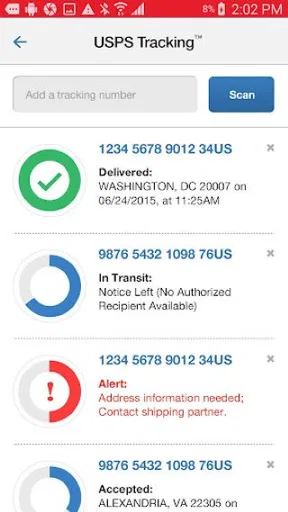
The saved tracking-number option is more valuable than it first sounds. Instead of searching old emails every time I want to check a parcel, I can keep the number available in the app. My tip is to save a tracking number as soon as I have it, while the order confirmation or mailing receipt is still in front of me. That small habit makes later checks easier, especially when several deliveries are moving at once. It also reduces the chance of mixing up numbers copied from different messages.
Notifications can help when I care about a delivery but do not want to keep opening the app to refresh its status. I would turn them on selectively for parcels that matter, rather than treating every update as equally urgent. That keeps the feature useful instead of noisy. Since delivery-status updates can sometimes lag, I would treat a notification as a helpful prompt, not a guarantee that the latest event has appeared at the exact moment it happened.
Worth Reading Before You Choose

EA SPORTS FC Mobile 26 Is a Bigger Football Game, but It Takes Time

Flipboard Shows What News Apps Must Do Beyond the Feed

Switching to Android Auto Means Rethinking Your Driving Routine

Google Calendar Makes a Crowded Week Easier to Manage

Ludo King Makes the Most of the Minutes Between Plans

Baby Panda World Brings Quick Play to Modern Phones, but Its Game Library Feels Busy
How it fits into a real mailing day
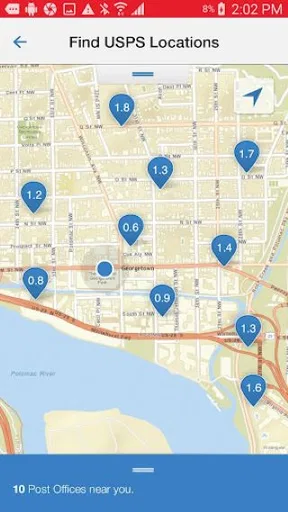
Imagine I have a return to send and a family package to prepare. I can check the return’s tracking number if it has already entered the postal system, use the price calculator while deciding how to send the gift, and look for a nearby post office if I need to take a parcel in. If a pickup is more convenient, the app also offers a way to schedule one. That does not mean every part of mailing is completed in a single tap; the benefit is that I can handle several USPS-related decisions from one mobile starting point instead of hunting for separate tools.
For people who work from home, receive frequent deliveries, or send items to friends and relatives, that kind of routine can be especially handy. A small business owner who uses USPS may also appreciate being able to check shipments and estimate mailing costs while away from a desk. I would not treat the app as a complete shipping-management system for a business with complex needs, but it can help with straightforward postal tasks during a busy day.
When another option is more sensible
If I mainly want a unified view of parcels from different couriers, a multi-carrier tracking service may suit me better. If I only need a one-off status check and already have the tracking number, a direct web check can be quicker than installing an app. USPS Mobile earns its place when I want more than that occasional lookup: saved numbers, notifications, postal-location searches, pickup scheduling, and shipping estimates all become more useful with repeated use.
The app’s range can also be a drawback for someone who wants a minimal screen with one obvious action. I would suggest starting with the task I expect to use most, then ignoring the rest until needed. There is no reason to learn every tool at once. The straightforward layout helps, but the app still makes most sense to people who recognize the value of having several postal options close at hand.
For a first-time user, the basic decision is simple: do I use USPS often enough to want tracking and postal errands together? If yes, the app is an easy one to try. It is free, and its Everyone age rating makes it broadly suitable, while the 4.7 average rating from around 64,000 ratings suggests many users find it worthwhile. It has over 1 million installs, and its 17,000 reviews reflect a substantial audience. Its current version is 6.2.1, with Android support beginning at version 6.0; it was released on October 23, 2023.
I would not choose it solely because a high rating promises a perfect experience. The occasional lag and slower tracking updates mentioned in my experience are worth keeping in mind, particularly when a parcel is time-sensitive. For an urgent delivery question, I would check the latest status directly and use the app as a convenient aid rather than assuming every screen refreshes instantly. That expectation makes its strengths easier to appreciate without asking it to do more than a mobile postal tool can reasonably do.
Ever found yourself anxiously waiting for a package and wondering where it is? Well, USPS MOBILE® might just be the app you need in your life. As someone who loves online shopping (maybe a bit too much), I decided to give this app a whirl, and honestly, it's been a bit of a game changer.
Tracking Made Simple
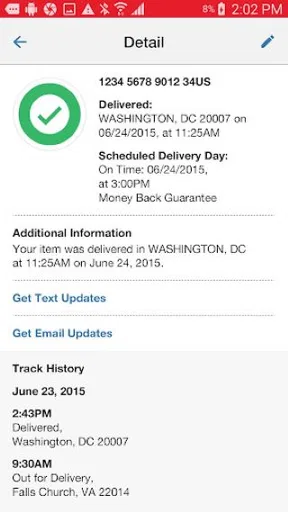
One of the main features of USPS MOBILE® is its package tracking. It's as easy as pie! You just enter your tracking number, and boom, all the details are right there at your fingertips. The interface is super clean, so even if you're not a tech whiz, you'll find it a breeze to use. Plus, you can save your tracking numbers, which means no more digging through old emails to find them. Trust me; it's a huge time saver.
More Than Just Tracking
But wait, there's more! The app isn't just about tracking packages. You can also schedule pickups, find post offices nearby, and even calculate shipping prices. It's like having a mini post office in your pocket. I found the price calculator especially handy during the holiday season when I was sending gifts to family. It made it so much easier to budget my shipping costs.
User Experience
Now, let's talk about the user experience. The app design is pretty straightforward, and navigation is a breeze. I did notice a slight lag every now and then, but it's nothing too bothersome. The app is available for both Android and iOS, so no one's left out. And did I mention it's free? Yeah, that's always a nice bonus.
The notifications are another feature worth mentioning. You can set them up so you get real-time updates on your package status. It's like having a personal assistant keeping you in the loop, which is pretty awesome if you ask me.
Room for Improvement?
Of course, nothing's perfect, right? I did notice that sometimes the updates could be a bit slow, especially during peak times. Additionally, while the app offers a lot, it might overwhelm someone who's just looking to track a package and nothing more. But hey, I'd rather have too many features than not enough.
All in all, if you're someone who frequently uses USPS services, this app is worth checking out. It's got a lot to offer and really makes managing shipments a whole lot easier. Give it a go, and you might just find it becomes one of your go-to apps for keeping tabs on your mail!
Pros
- User-friendly interface simplifies navigation.
- Real-time tracking for all your parcels.
- Integrated barcode scanning feature.
- Schedule pickups directly from the app.
- Access to USPS services anytime
- anywhere.
Cons
- Limited features compared to the website.
- Occasional slow loading times.
- Some tracking updates are delayed.
- Requires a stable internet connection.
- No dark mode option available.
FAQs for USPS MOBILE®
What features does the USPS MOBILE® app offer?
The USPS MOBILE® app provides a comprehensive suite of features to help you manage your postal needs. You can track packages, schedule pickups, find nearby post offices, calculate shipping prices, and set up informed delivery notifications. Additionally, it offers a convenient click-and-ship service for sending packages without visiting a post office.
Is the USPS MOBILE® app free to use?
Yes, the USPS MOBILE® app is completely free to download and use. However, standard postal fees apply for services like shipping and package pickups. There are no hidden charges for accessing any of the app’s features, making it a budget-friendly option for managing your postal services.
How secure is my information on the USPS MOBILE® app?
The USPS MOBILE® app employs robust security measures to protect your personal and financial information. It uses encryption protocols to safeguard data and requires secure login credentials. It's important to ensure your device is also secure by using passcodes and keeping your app updated to the latest version.
Can I use the USPS MOBILE® app to track international shipments?
Yes, the USPS MOBILE® app allows you to track both domestic and international shipments. You can input your tracking number to receive real-time updates on your package's journey. However, the level of detail may vary depending on the destination country and their postal service's tracking capabilities.
Does the USPS MOBILE® app support multiple accounts?
The USPS MOBILE® app supports multiple accounts, allowing users to manage personal and business postal needs efficiently. You can switch between accounts seamlessly within the app, making it easier to handle various shipping tasks and keep your postal information organized.


